Elizabeth Rennie
AI Semantic Search for LMS Content Selector
User Experience, AI Search, Semantic Modeling, LMS Integration
Overview
This concept explored how AI could streamline LMS course setup by helping instructors find relevant course materials directly within the LMS, without needing to open the learning platforms to preview content.
I led the UX strategy and design for this AI-powered semantic search concept, pitching it to product and AI leadership to address a known LMS friction point. The concept targeted new instructors, edition switchers, and users unfamiliar with content structure—groups often unsupported during course setup—and laid the groundwork for future AI investment opportunities.


🎯 Tasks & Goals
-
Reduce the need for instructors to launch into the full platform to validate content relevance
-
Allow for nuanced content discovery using concepts like “Florentine Artists” or “Roman architecture”
- Address the limitations of current content selectors, which assume deep content familiarity, leaving new users and adopters unsupported during setup
🎨 Design Deliverables
-
High-fidelity prototypes
-
Interaction model for semantic search
-
Prompt structure + result hierarchy
🤝 Stakeholders & Collaboration
- AI Leadership
- Product Leadership
- Product Managers
- Technical Product Managers
- Development Teams
💼 Business Opportuntiy
Many LMS users face friction when setting up courses, especially those unfamiliar with content structure or switching editions. Current systems assume deep content familiarity or require platform switching to validate content. Nearly 80% of instructors work primarily in the LMS, yet platform-led tools prioritize in-platform users.
This concept introduced an AI-powered discovery layer designed to:
-
Surface content aligned with an instructor’s teaching goals, not just chapter titles.
-
Use natural language inputs (e.g., “Florentine artists,” “Roman architecture”) to find semantically relevant content.
-
Reduce time spent switching tools or manually previewing content.
By targeting this overlooked moment in LMS setup, the solution aimed to reduce friction, improve instructor confidence, and expand AI-powered support to a wider user base.
Design Goals
- Reduce decision-making time during course setup
- Help instructors find content based on what they teach—not just what it’s labeled
- Keep instructors in the LMS experience without needing to switch platforms
🎨 Design Concept
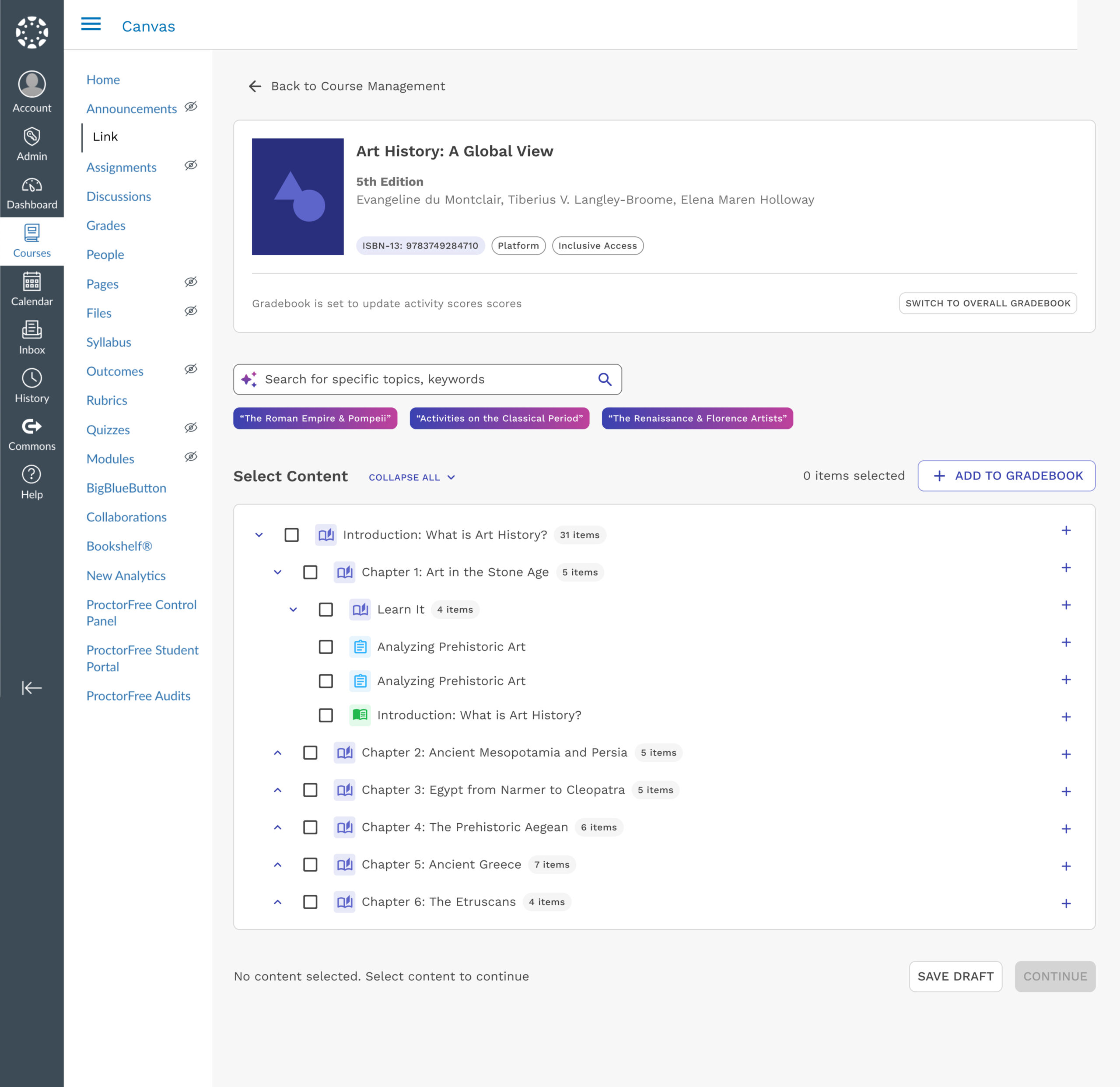
Content Selector Search
Instructors can search for content directly in the LMS using natural language inputs, removing the need to open full platforms or navigate rigid content structures. This makes setup faster, more intuitive, and better suited to LMS workflows.
Natural Language Input Bar
Search by concept or theme, no need to know exact chapter titles
Search Chips
Quick-access tags help surface nuanced topics like ‘Florence Artists’ or ‘Roman Architecture
Streamlined Selection Panel
Familiar UI keeps instructors oriented while surfacing semantically matched content
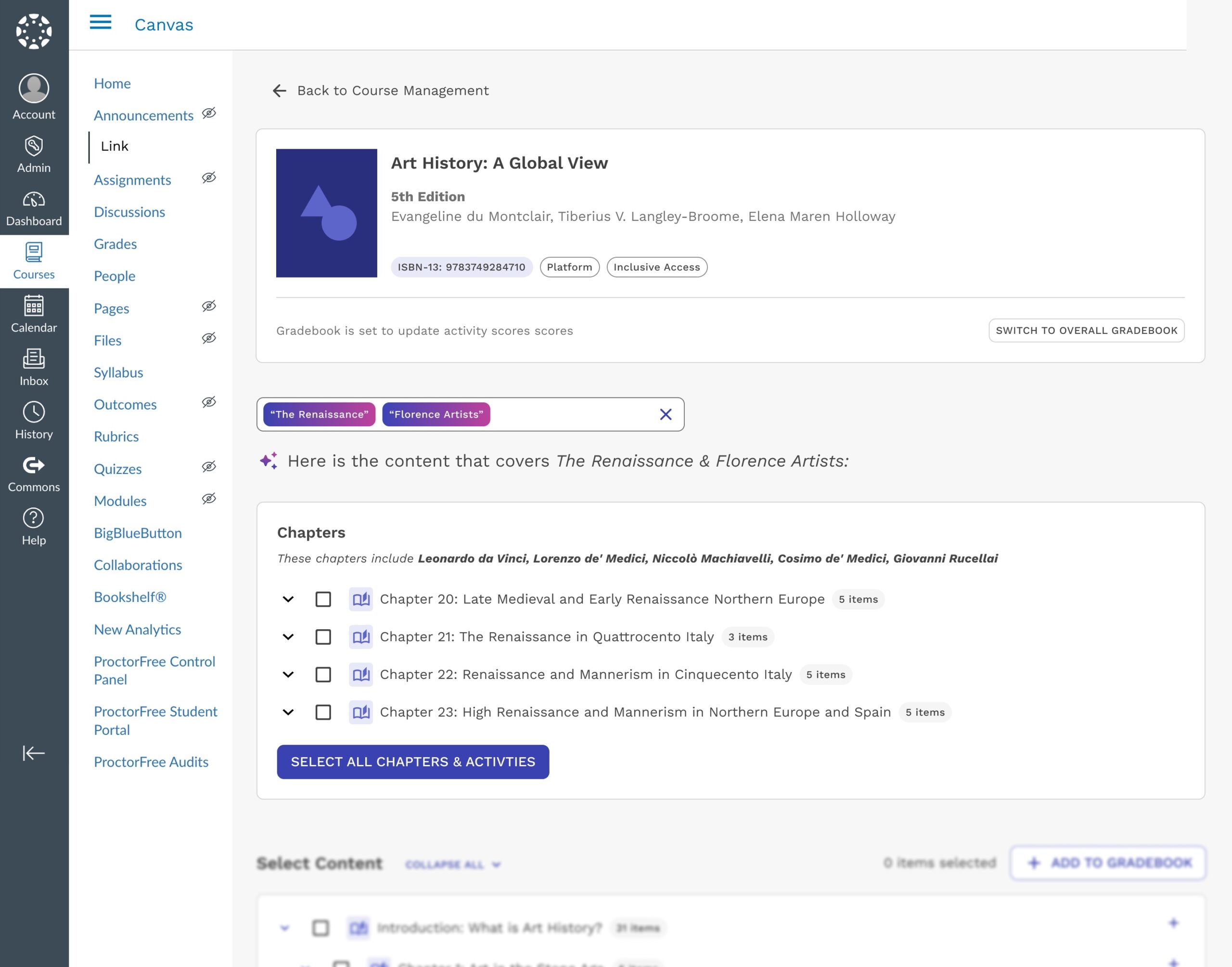
Semantic Search Results
Searches like “The Renaissance” or “Florence Artists” semantically return relevant content, surfacing chapters covering figures like da Vinci and the Medici family automatically. This streamlines content selection and reduces reliance on previews or content familiarity.
Search Query Box
The Renaissance & Florence Artists’ — supports fuzzy matching and related terms
Result Highlight Section
Results grouped by semantic relevance, not just keyword match
Chapter Metadata (e.g., Artist Names)
AI surfaces content covering da Vinci, Medici family, and related figures automatically
Maintains LMS Context
No platform-switching needed, streamlines setup for new instructors
📈 Future Potential & Impact
This concept is under review as a potential AI initiative for future LMS integration. If developed, it could:
-
Reduce setup time by helping instructors find aligned content faster.
-
Enable intuitive discovery for new instructors and edition switchers.
-
Support platform consolidation by bridging gaps between legacy and current systems.
Critically, this solution challenges the assumption that most instructors don’t need help selecting content. Supporting the ~25% of users navigating new content could reduce churn, ease transitions, and build confidence across the LMS experience.