Elizabeth Rennie
LMS Integration
Optimizing course setup to drive adoption, reduce operational friction, and support platform growth.
TL;DR
- 95% reduction in task time (30min → 1.5min)
- 32% increase in completion rate (55% → 87%)
- 24% reduction in support cases (6,630 → 5,040/year)
- 18% increase in platform adoption vs. LMS
The Hidden Tax on Every Semester
Every August and January, thousands of instructors face the same painful situation: setting up their online course materials for a new semester. What should take 10 minutes routinely consumed 30+ minutes of work, and that’s assuming everything went right.
88% of our users complete this process within their Learning Management System (LMS). This experience was so broken that it generated 6,630 support cases annually and drove course abandonment at a critical moment in the semester.
This was UX problem but more importantly, it was a strategic vulnerability. Every failed integration was:
- A trust deficit with instructors
- A missed opportunity to prove platform value when it mattered most
- A competitive disadvantage (competitors made this workflow easier)
My Role & Approach
I led the end-to-end redesign as the sole UX designer, partnering with product management to reframe this from a “feature fix” to a strategic priority. Including:
- Conducted deep discovery to understand systemic issues (not just UI problems)
- Designed and validated solutions through iterative prototyping
- Collaborated with engineering to implement a redesign that reduced friction by 95% while maintaining technical complexity behind the scenes
- Influenced product roadmap based on research insights
The impact of this work
+32%
Task Completion Rate
Increased MindTap course creation and LMS integration task completion from 55% to 87%.
-95%
Decrease Average time on task
Reduced average task time from 30 minutes to 1.5 minutes, significantly simplifying the instructor workflow.
-24%
Decrease Support Cases
Reduced customer support case volume by 24% YoY
(6,630 → 5,040)
Part 1: Understanding the System, Not Just the Symptoms
Initial Diagnosis: The Problem Was Bigger and Deeper than Expected
Initial stakeholder consensus pointed to UI problems: confusing labels, hidden options, too many clicks. As I began discovery, I expected to find cosmetic issues I could fix with better microcopy and visual hierarchy.
But the research revealed something more fundamental: we were setting instructors up for failure.
The existing flow wasn’t just broken in isolated places. The entire experience deviated from instructor’s mental models and expectations, creating a cascade of friction that resulted in:
- 300 cases of course severing per term requiring ~500 hours of DSS team intervention
- 6,630 annual support cases for what should be a straightforward task
- Instructors abandoning the flow and requesting manual setup from support rep
Discovery Methods
To get to the root cause, the UX Researcher and myself combined multiple research methods:
Usability Benchmarking Study
Tested current flow with 14 higher education instructors, measuring task completion, time on task, and failure points
Competitive Analysis
Deep evaluation of Pearson and McGraw Hill’s integration flows
Support Ticket Analysis
Patterns in 6,630 annual support cases
Journey Mapping
End-to-end instructor course setup workflow across LMS, CIC, and Learning Platform
User Interviews
Qualitative insights from instructors about expectations and pain points
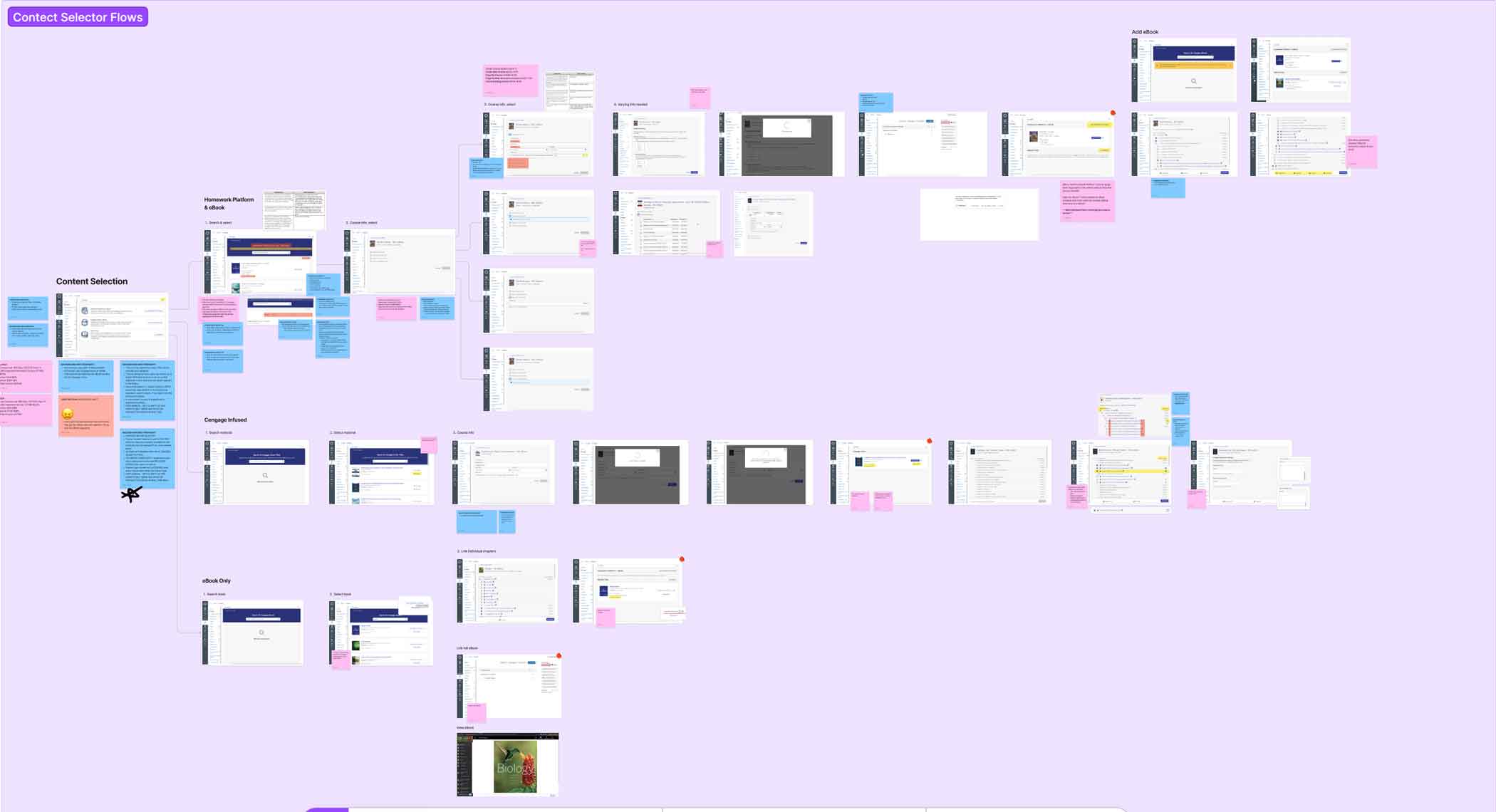
Full, detailed flow analysis for LMS course creation in FigJam
Three Major Themes Emerged from Research
1. Broken & Confusing Flow
The LMS content selector starts users in “explore and discovery” mode, making them search for their title. This is the wrong context for this flow and defies user expectations.
“Didn’t I do this already?”
— Instructor reaction when asked to re-identify their material
To the user, they’ve already invested time finding, evaluating, and selecting a title. But in the content selector flow, they repeat the duplicative tasks of re-identifying their material.
This happened because data wasn’t flowing seamlessly across systems (LMS, CIC, Learning Platform). The result: instructors felt like the system didn’t remember their previous choices.
The impact: Instructors expect to pick up where they left off. Instead, they’re forced backward into discovery mode, creating confusion and frustration.
2. Lack of Continuity & Duplicate Work
The system does not preserve user context, forcing instructors to repeat work they’ve already completed.
“Didn’t I already pick this?”
— Instructor reaction when asked to re-select materials
Instructors already spend time adopting and selecting course materials. However, during LMS setup, they must re-search, re-select, and re-confirm the same content.
This occurs because adoption data and course setup data are not shared seamlessly across systems.
The impact: Users feel like the system is not “aware” of their progress. This creates frustration, wasted time, and a perception of inefficiency—especially during time-sensitive course setup periods.
3. Misalignment with Instructor Mental Models
The LMS experience does not match how instructors naturally think about building and managing courses.
“I just want to choose what I assign—not everything at once.”
— Instructor expectation during content selection
Instructors expect to:
- Pick up where they left off
- Select and customize content at a granular level (e.g., specific questions)
- Manage content and setup in one place
Instead, the system:
- Separates setup from content selection
- Forces full-content imports
- Requires context switching between platforms
The impact: High cognitive load and reduced usability. Users feel constrained by the system rather than supported, leading to workarounds or reliance on support.
Strategic Decision Point
Rather than just polishing the existing UI, I advocated for redesigning the information architecture to align with instructor mental models while respecting the technical constraints that made separate systems necessary.
I reframed the problem: not as “bad UI” but as “systemic user failure costing hundreds of support hours per term and eroding competitive advantage.”
Through collaborative sessions, we established 3 key priorities for the future state:
1. Seamless Flow of Data
Reflect previous choices, eliminate duplicate steps
2. Clear & Guided Steps
Walk users through course integration with visible progress
3. Conversational UI
Make instructors feel supported, not abandoned
Part 2: Designing for Confidence, Not Just Completion
The Design Hypothesis
The redesign needed to solve two problems simultaneously:
- Reduce task time by eliminating redundant steps and clarifying decision points
- Build instructor confidence through progressive disclosure and visible progress
My hypothesis: If we restructured the flow to match instructor mental models, we could make the process both faster and less anxiety-inducing.
But this required careful balance: simplifying the experience without hiding complexity that instructors actually needed to understand (ex: license types that have real pedagogical implications.)
Low Fidelity
The Redesigned Flow: From 5 Disjointed Steps to 5 Connected Decisions
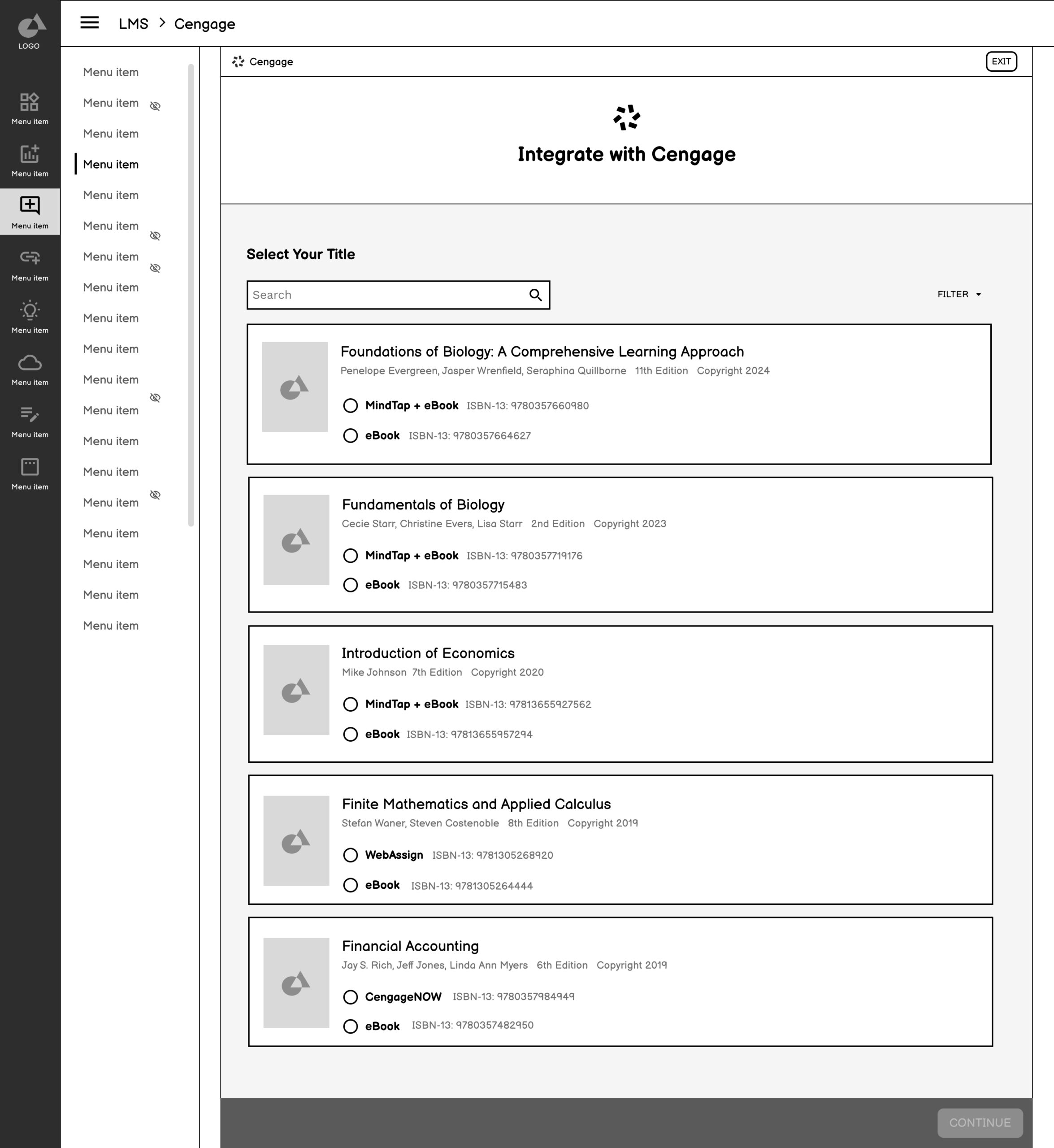
1. Select Your Title
Combining format selection into the initial step eliminated the confusing “format vs. content” distinction.
Why this works
✅ Reduces Complexity
This new launching step combines the format selection option, which often confuses users since it feels like they’re starting over.
Users will only see information that is crucial to them. Previously, there were several internal labels only meaningful to a customer support rep.
Users can call out immediately which option they need based on the option labels eBook or MindTap + eBook
✅ Matches Users Mental Model
Instead of introducing users to steps that feel repetitive, this landing page aims to reinforce and pick up where they left off.
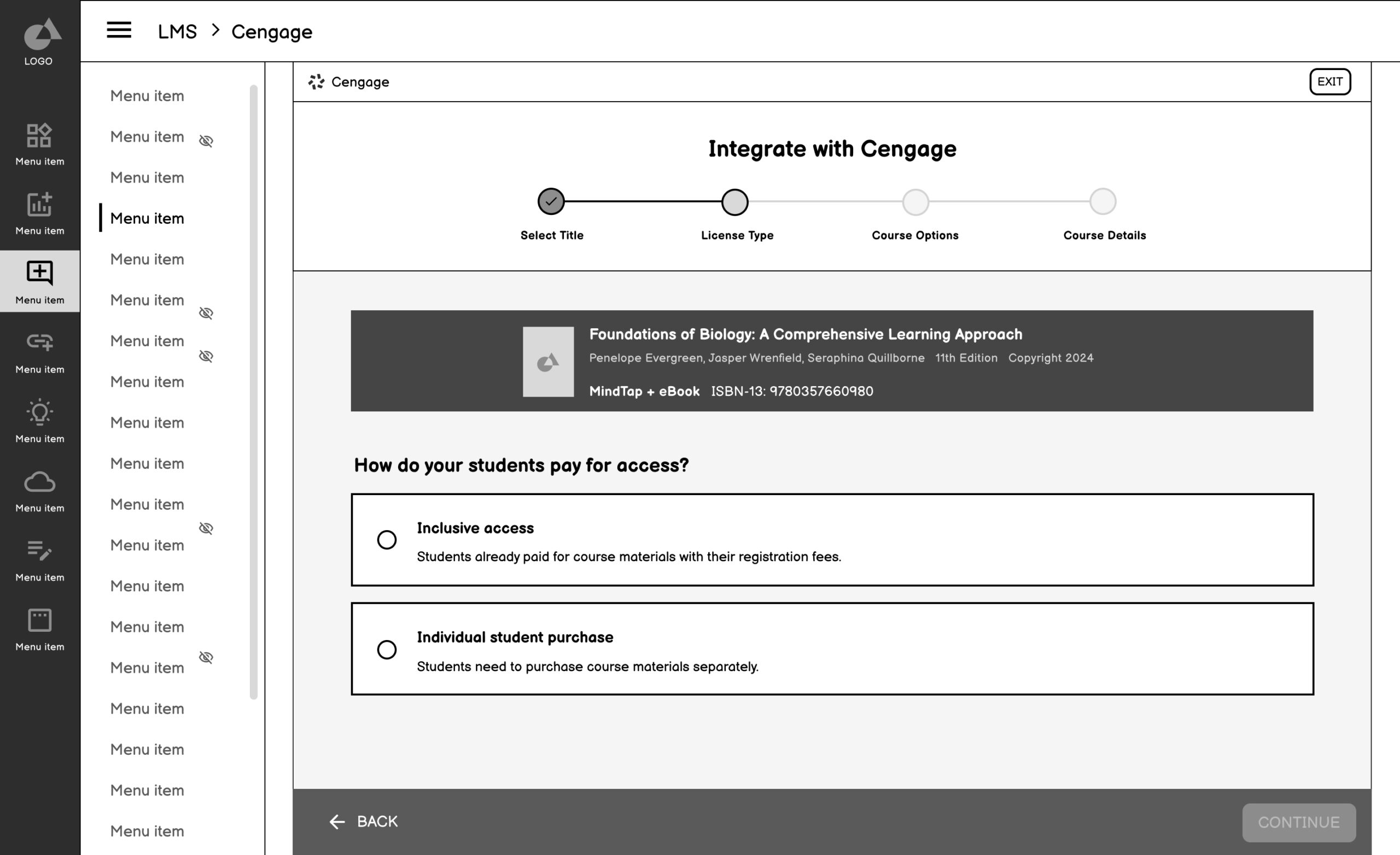
2. Select License Type
Elevated from buried option to dedicated step with clear explanations.
Why this works
✅ Isolated, Detailed Step
A major point of friction, prone to error was selecting the correct license type. Previously, this step was nested under the search and select and was often missed.
✅ Builds confidence with visible progress and summary
Reinforces a sense of momentum and reduces anxiety by showing selection summary and progression.
✅ Prevents missed or skipped steps
Ensures all critical decisions (like license type) are surfaced clearly rather than buried in other screens.
✅ Supports self-service and reduces reliance on support
Makes the flow more intuitive and instructor-friendly
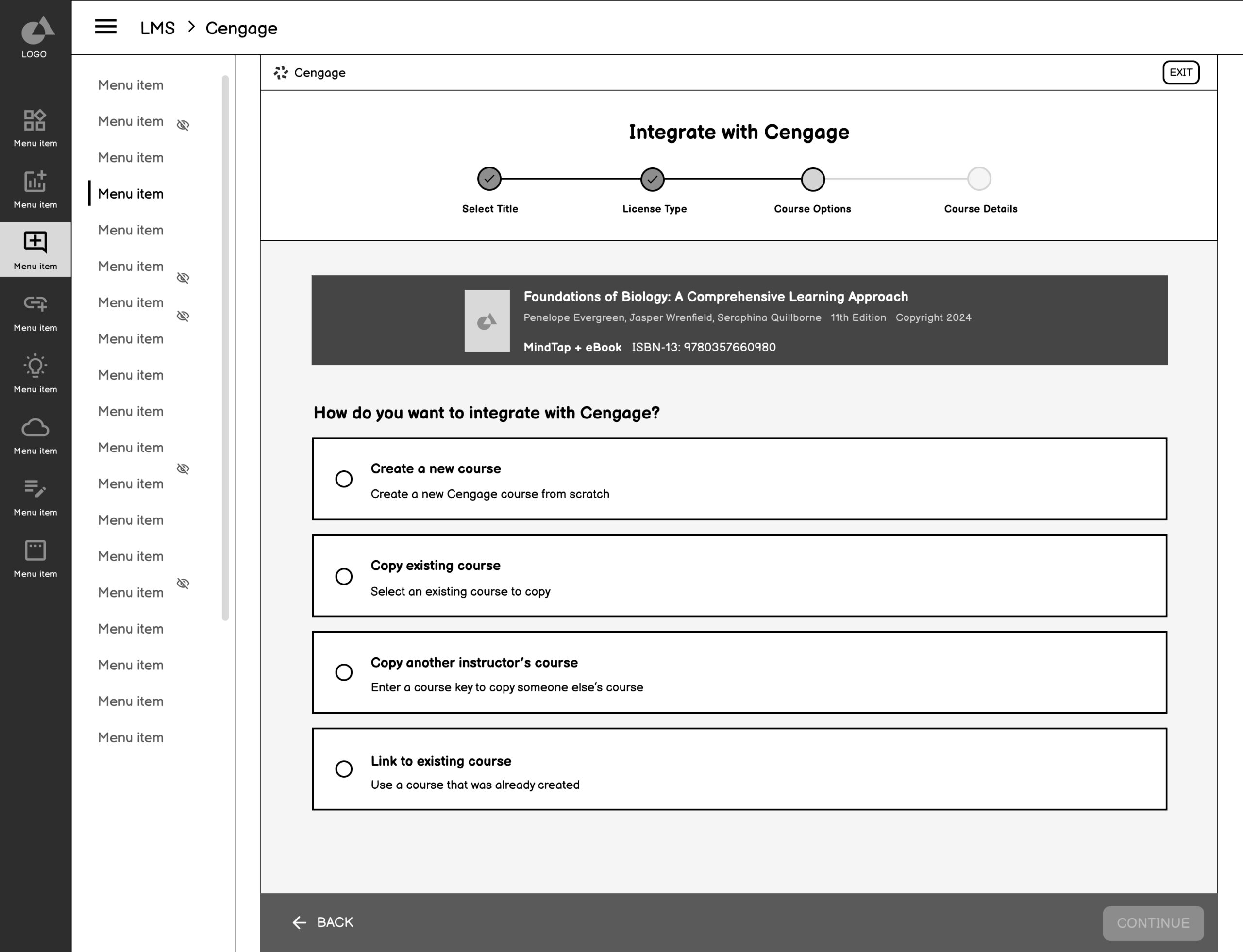
3. Course Creation Option
Clarified the distinction between creating new vs. copying existing, with clear explanations of what each choice means.
Why this works
✅ Option breakdown
Defines each option more accurately and removes ambiguity.
✅ Consistent UI patterns
Reinforces familiarity and reduces cognitive load by allowing users to focus on the decision—not on re-learning how to interact with each screen.
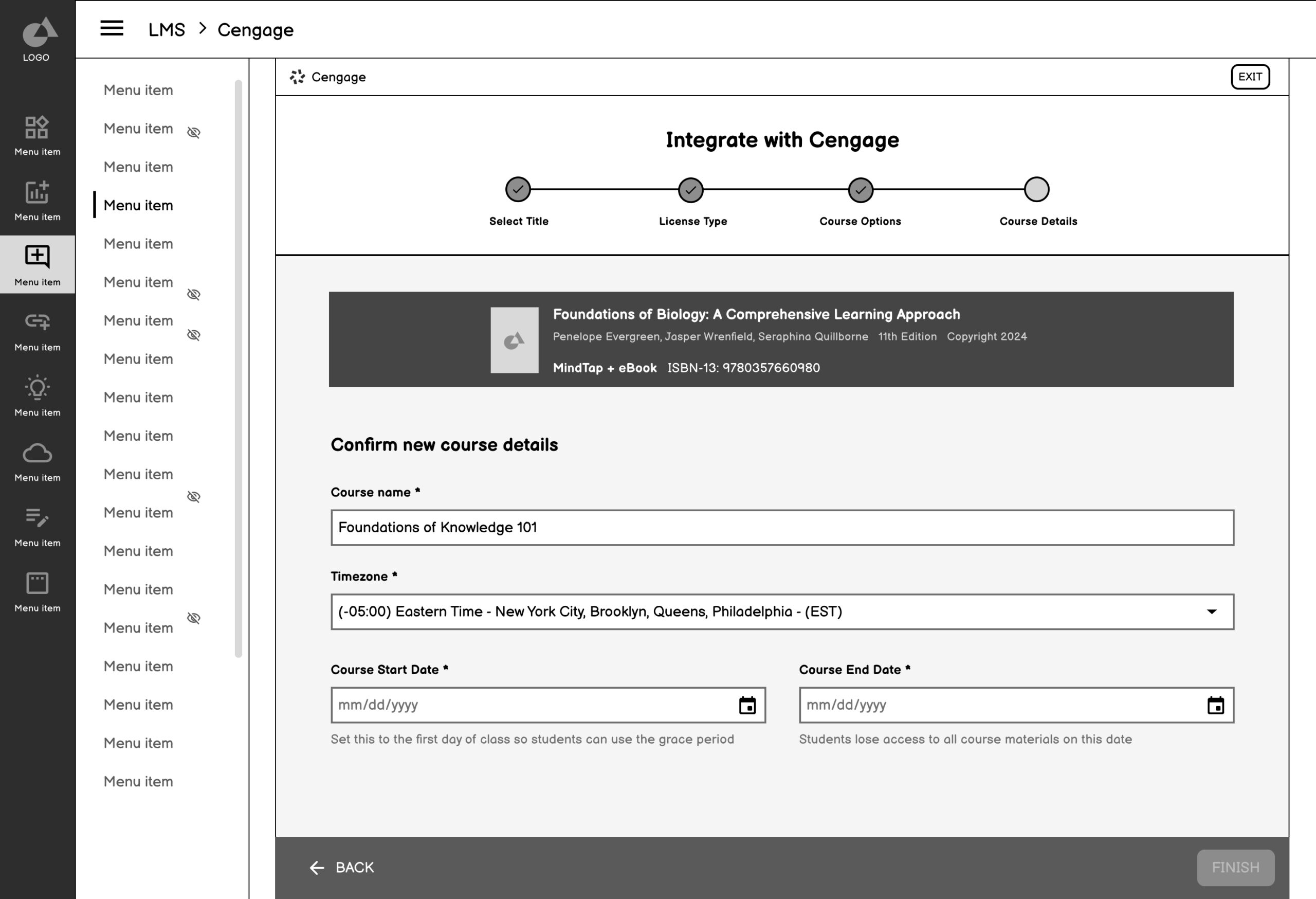
4. Confirm Course Details
Clarified the distinction between creating new vs. copying existing, with clear explanations of what each choice means.
Why this works
✅ Simpler Decision step
Removed from being nested into multiple decisions points.
5. Confirmation & Next Steps
Inform instructors they’re finished with the integration process and provide clear guidance on what to do next.
Why this works
✅ Comfirms completion
Inform users they are finished with the course creation process and give guidance on next steps.
Research & Testing
Goals
Discover if users understand the process of the proposed LMS integration flow
Discover what confuses users in the flow and what helps them
Determine what questions instructors may still have about LMS integration
Determine what we can iterate on to test in hi-fi sessions
Methodology
30 minutes
Moderated Usability Sessions
14 Higher Education Instructors
Figma Prototype & Current State
Key Findings
Simple and Familiar
The new flow tested was extremely successful. The order of the options were clear to instructors, and they vocalized how simple and familiar it was
Language is Everything
Because the flow is so simple, the language helps ensure instructors choose the right option for themselves.
Part 3: Validation & Refinement
Interaction Patterns, Validate Design Decisions, and Deliver Scalable UI
The high-fidelity designs translated our validated concepts into a polished UI that could be stress-tested for usability, clarity, and alignment with instructor expectations. These screens reflected a deeply considered UX strategy, incorporating feedback from usability testing, system stakeholders, and support teams. We introduced clearer labeling, progressive disclosure, and improved data visibility—reducing cognitive load and enabling self-service at key moments in the instructor journey.
Considerations & Constraints
While refining the final UI, I had to balance clarity and control with system limitations and technical feasibility. For example, we simplified license type visibility to reduce user error, but needed to preserve backend logic that couldn’t be altered. Additionally, we retained the Selecting Formats page as the landing experience to align with development timelines. These tradeoffs ensured the final design was not only user-centered but also implementation-ready and scalable.
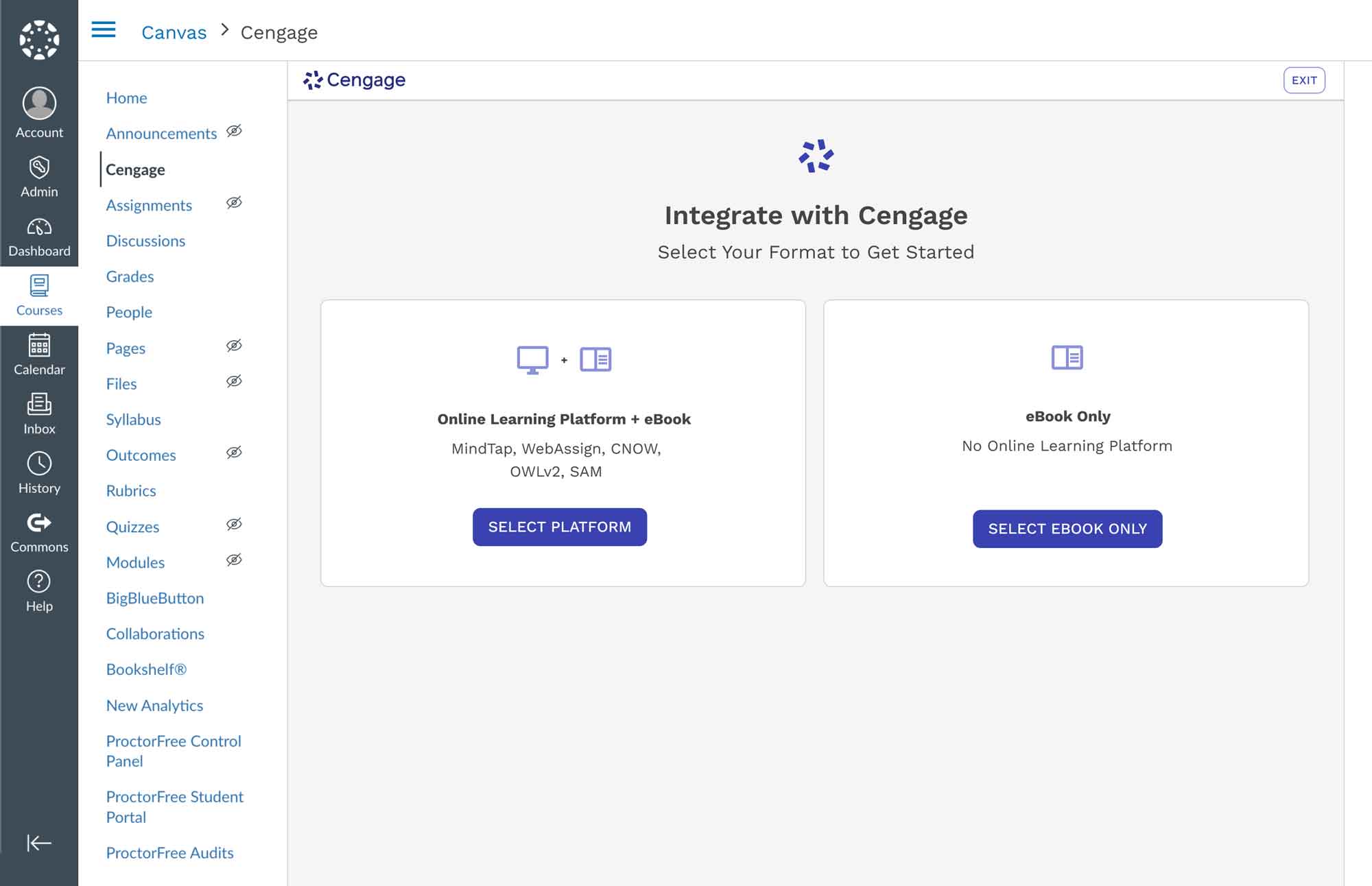
1. Select Format
Simplifies the experience further by grouping formats into two high-level paths, reducing cognitive load and guiding users into the correct flow more quickly.
Technical Constraint
Needed to maintain formats first to maintain release timelines and thoughtful implementation
Win
Although format selection had to remain, we streamlined the experience into two high-level options. This reduced visual clutter, eliminated product jargon, and made the step faster and easier, especially for instructors encountering it for the first time.
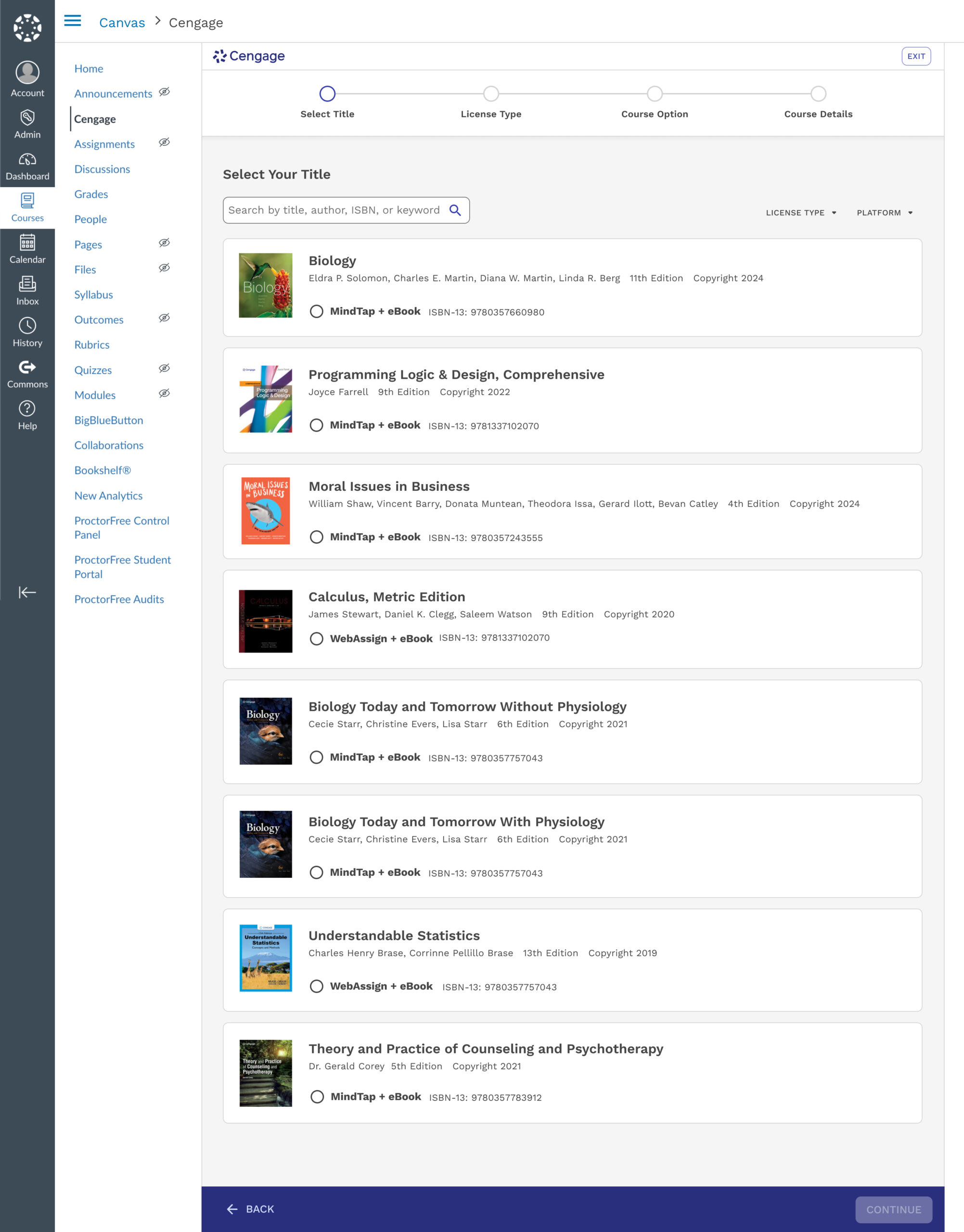
2. Select Title
Simplifies the experience further by grouping formats into two high-level paths, reducing cognitive load and guiding users into the correct flow more quickly.
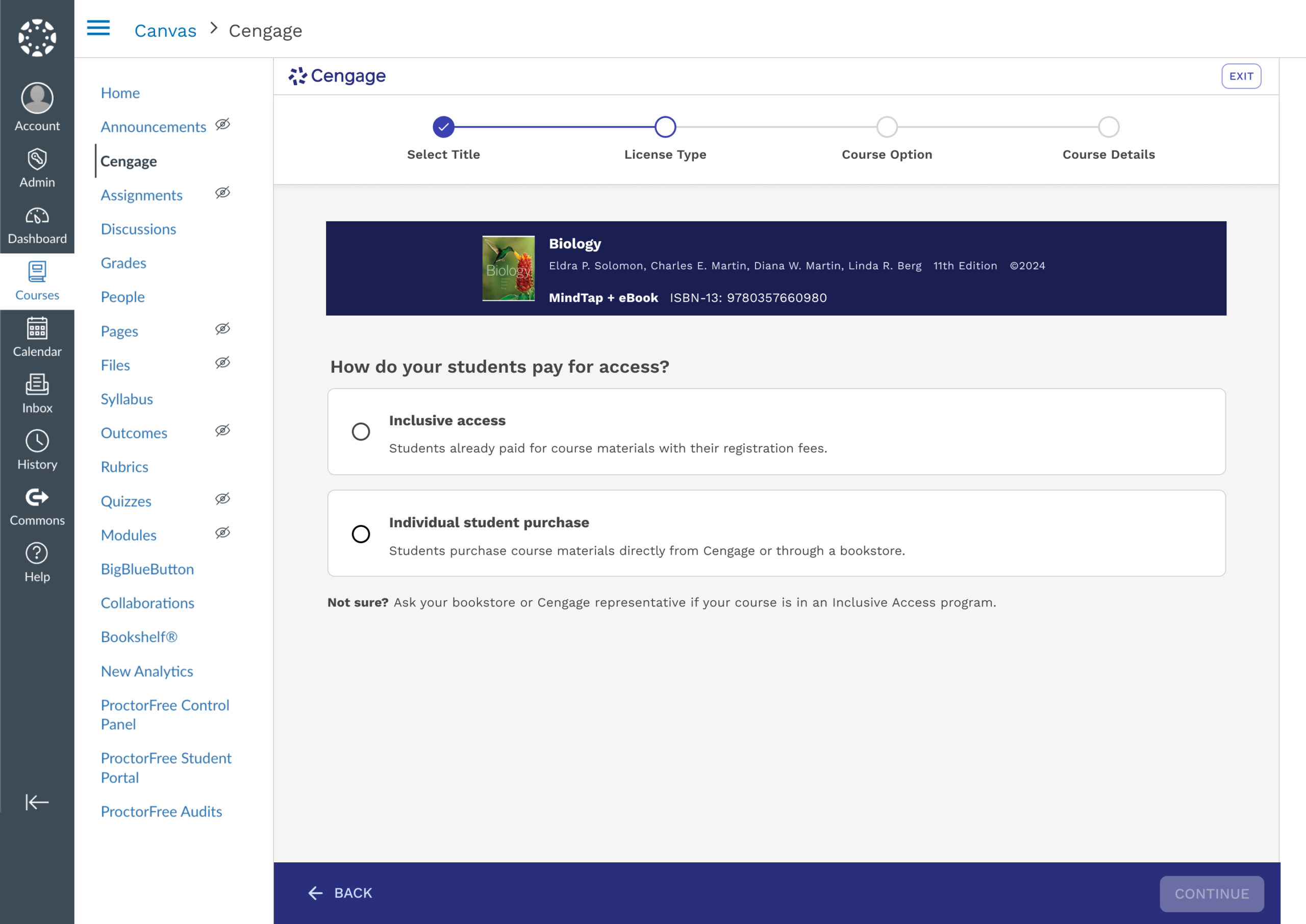
3. Select License Type
Helps instructors indicate whether students access materials through Inclusive Access or individual purchase, with guidance for those unsure of their model.
Technical Constraint
Although this step was a common friction point, it remained essential to the intake process and could not be removed.
Win
We refined the language and added contextual support, which significantly reduced confusion and helped instructors complete the step with more confidence.
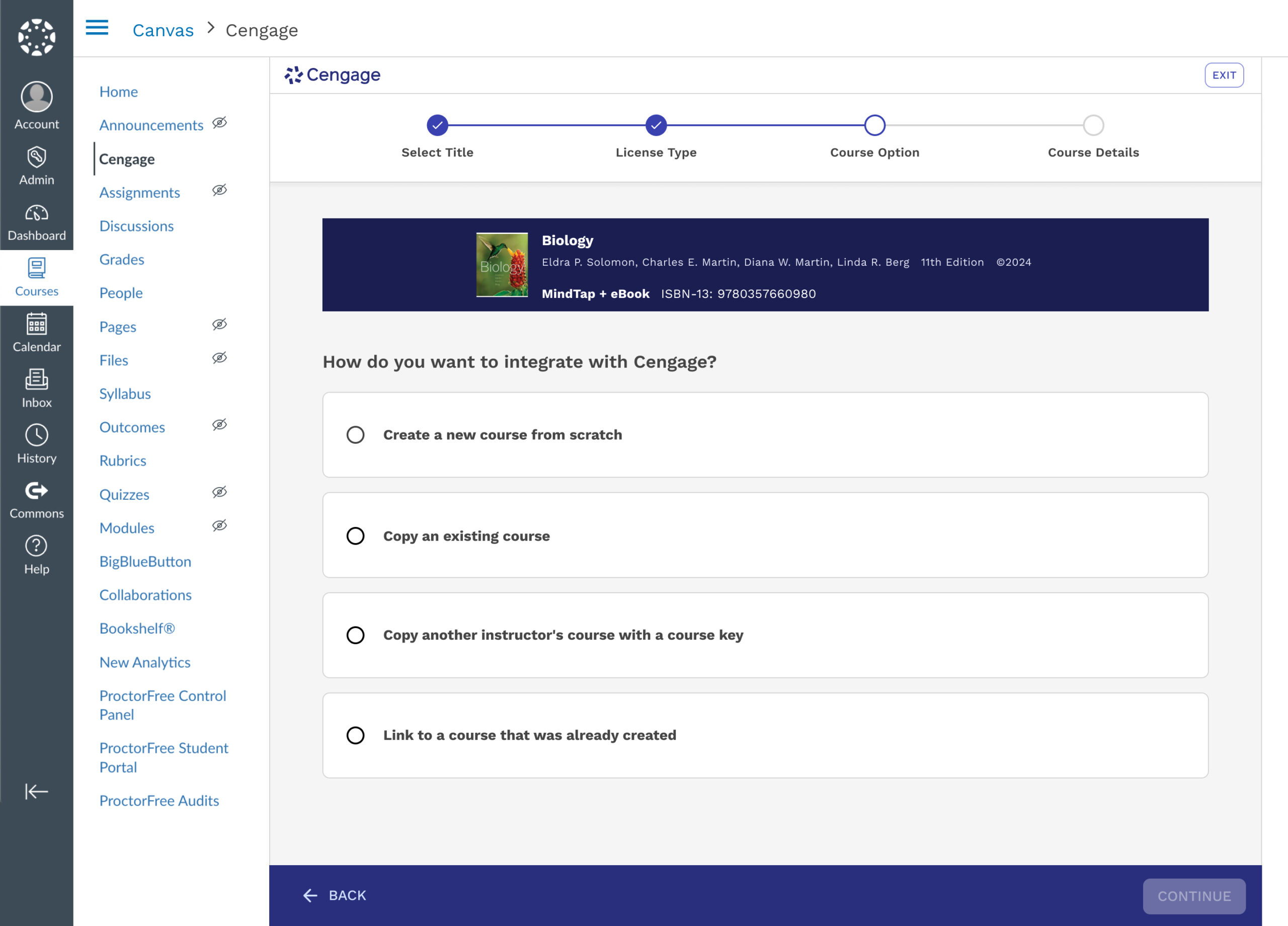
4. Select Course Option
Simplified complex options into clear, selectable paths to course creation.
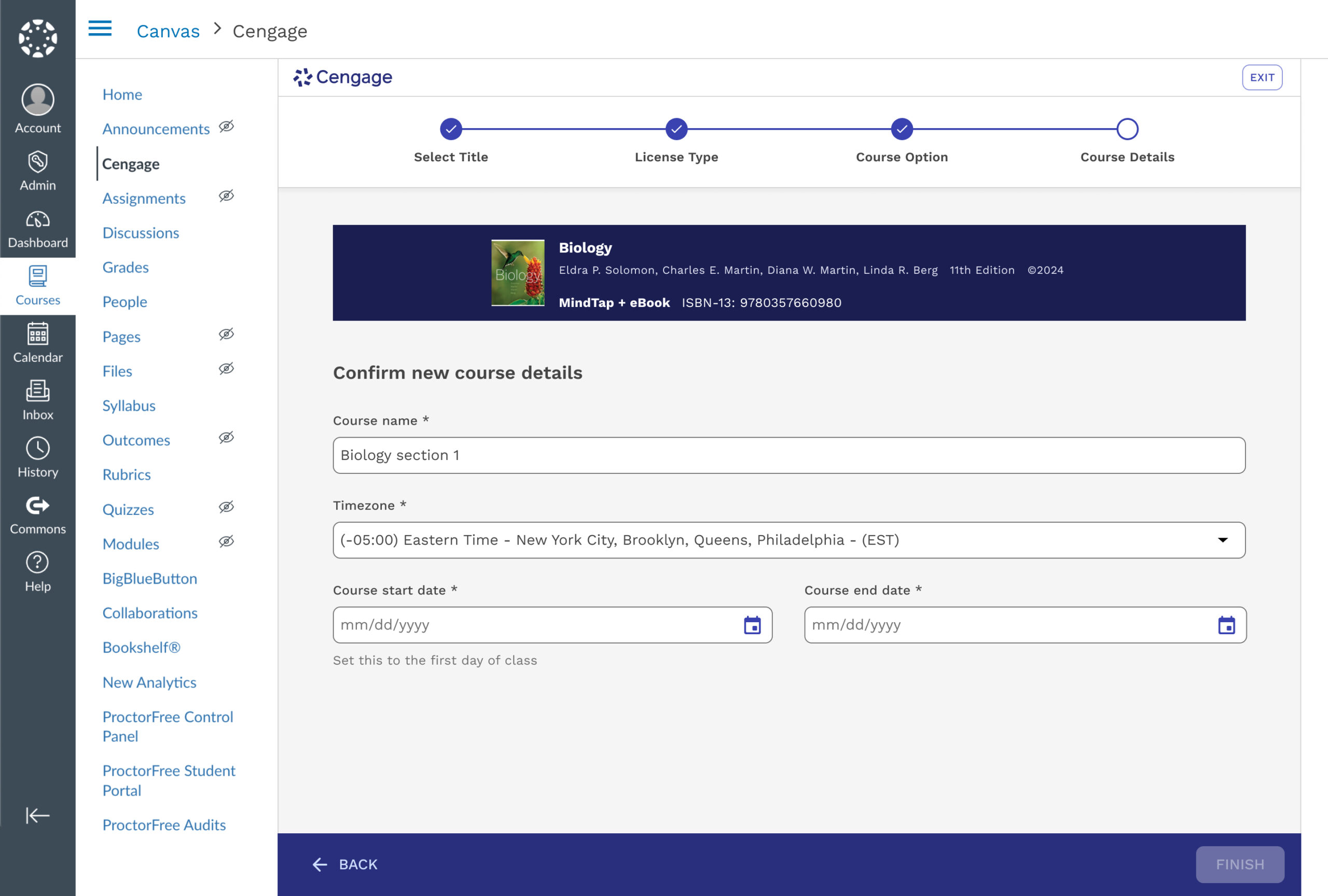
5. Confirm Course Details
Confirm key course details before finalizing integration. It ensures accurate setup for syncing Cengage content with the LMS and makes sure the student grace period is accurately provided.
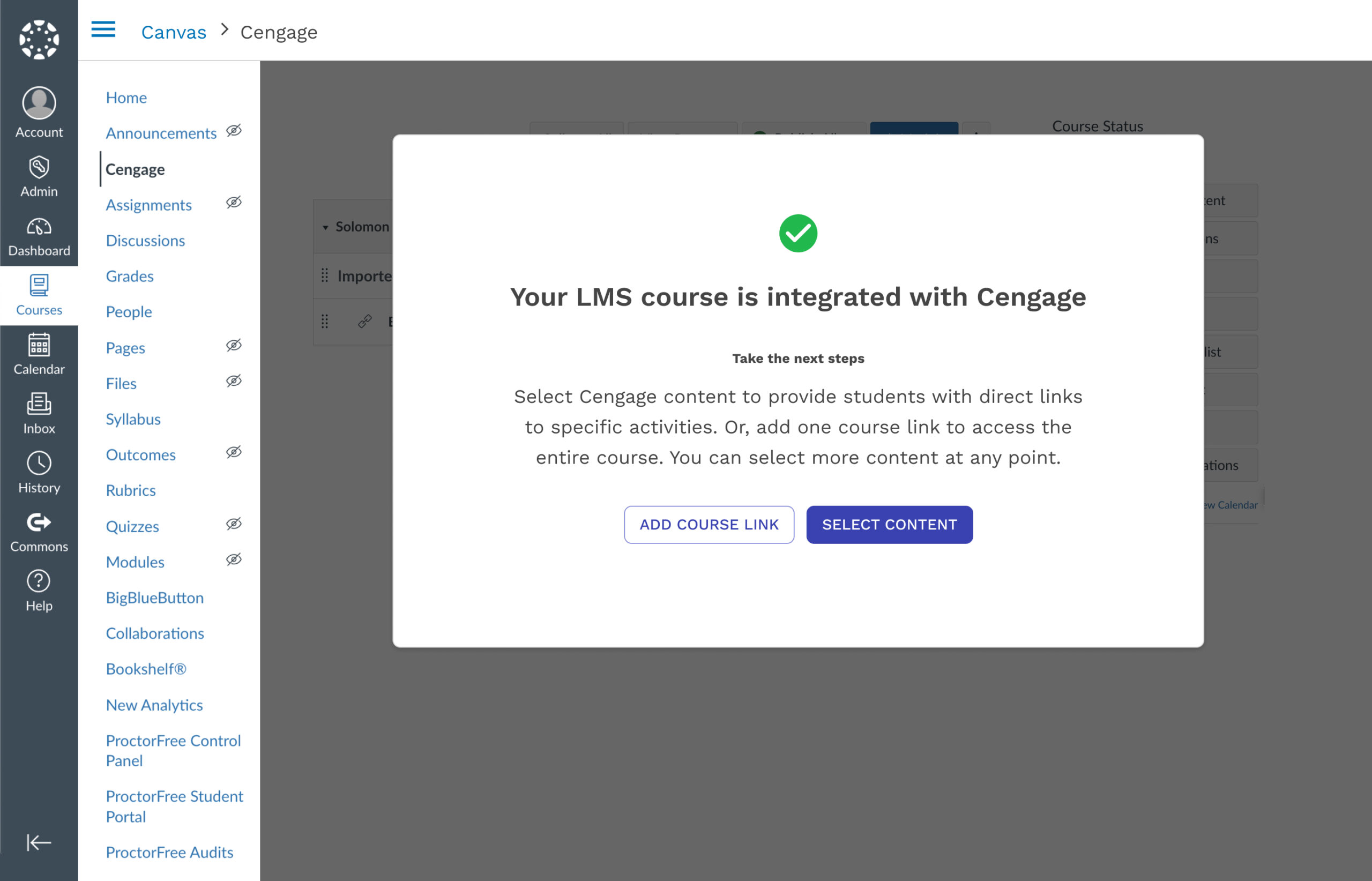
6. Confirmation
Notifies instructors that LMS integration is complete and offers clear next steps to begin linking Cengage content. It supports immediate action by presenting the most common tasks post course creation.
Impact & What I Learned
12 months post launch
User Metrics
+32% completion (55% → 87%)
-95% time (30min → 1.5min)
+18% platform adoption over LMS
Business Metrics
-24% support cases (6,630 → 5,040 annually)
-89% license confusion tickets (was #1 support driver)
+~9.4% Increased Enrollment
What I Learned
Strategic influence requires evidence + narrative
The project nearly got deprioritized three times. What changed minds was consistently connecting that data to instructor trust and competitive positioning. I learned to frame UX problems in terms stakeholders care about: cost, retention, and competitive advantage.
Systems thinking beats screen polish
The core challenge was navigating the constraints of separate technical systems, LMS, Learning Platform, and Instructor Center, that couldn’t be unified architecturally. The UX succeeded by making those seams invisible to instructors.
Small language changes have outsized impact
“Select Your Title” vs. “Select Content” was a 2-word difference that improved instructors’ confidence. I now collaborate with content strategists earlier in the process.
Accessibility improves experiences universally
Progress indicators ended up reducing anxiety for all users. Designing with accessibility in mind from the start creates better experiences for everyone.
Other Case Studies: K-5 UI Platform • AI Semantic Search
Project completed at Cengage, June 2023–January 2025.
Results measured through January 2026.